ThinkNode M1
The ThinkNode M1, by Elecrow, is a radio for Meshtastic networks. See the practical specifications, estimated price and where to buy below.
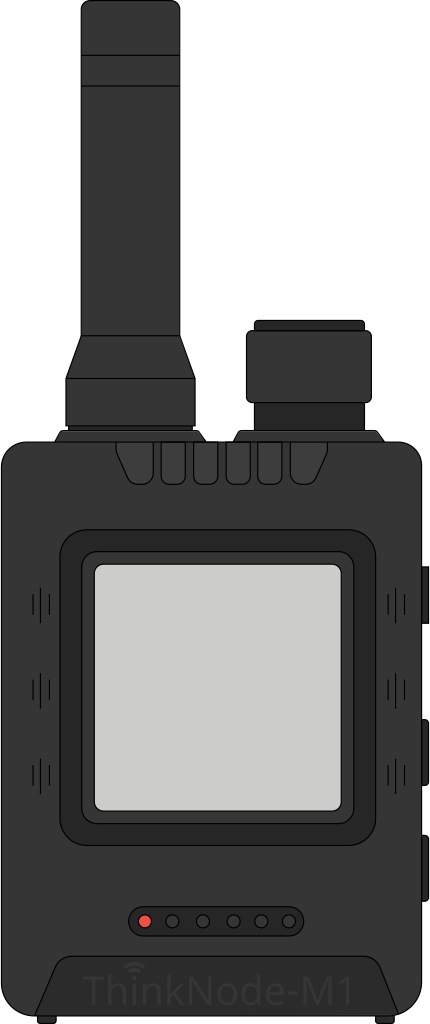
Specifications
Click the icon next to each item to see the available options and their pros and cons.
- Processor: nRF52840
- Battery: Yes
- Connectivity: LoRa, BT
- Display: E-ink 1,54" (E-ink, 200x200)
- Case: Yes
- Expandable: No
- Built-in GPS: Yes
- Buzzer: Yes
Estimated price (USD)
$69.99
Processor
| Chip | Built-in radio | Power draw | Best for |
|---|---|---|---|
| ESP32 (all variants) | Wi-Fi + Bluetooth | Higher | Powered fixed nodes, MQTT gateways, bigger/touch screens |
| nRF52840 | Bluetooth (no Wi-Fi) | Very low | Battery-powered portable nodes, long runtime |
| RP2040 / RP2350 | None (USB only) | Low | Low-cost DIY boards (Pico, RAK11310) or as a dedicated sensor co-processor on more capable nodes (e.g. SenseCAP Indicator) |
ESP32 variants found on Meshtastic devices:
- ESP32 (original): dual-core, Wi-Fi + classic Bluetooth/BLE - the base for early nodes like the T-Beam, Heltec V1/V2 and T-LoRa V1/V2.
- ESP32-S3: dual-core with more RAM/GPIO and native USB - today the most common variant, found on bigger screens and touchscreens like the Heltec V3/V4, T-Deck, T-Watch S3, Vision Master and Station G2/G3.
- ESP32-C3: single-core RISC-V, smaller and cheaper - used on the Heltec HT62.
- ESP32-C6: RISC-V with Wi-Fi 6 and Zigbee/Thread (802.15.4) support - used on the LilyGo T-Lora C6 and M5Stack Unit C6L.
In practice: among ESP32 variants, the S3 is now the most common on new devices (especially ones with a screen); the nRF52840 wins on battery life; and the RP2040 shows up both on cheap DIY boards and as a dedicated sensor co-processor on more capable nodes - on the SenseCAP Indicator, for example, the ESP32-S3 drives the 4" touchscreen and connectivity while a separate RP2040 processes the sensors, a division of labor typical of devices that need more processing power.
Battery
Yes: the device has a built-in battery, already integrated inside the case and ready to use, or a proper slot for a standard battery format, like the 18650 holder on the T-Beam.
No: the device has no dedicated place to fit a battery. This includes boards that only have a JST connector for a LiPo pack - that's just a power input, not a fitted slot, so the battery ends up loose, taped or velcroed on externally.
Connectivity
Besides the LoRa radio (which forms the mesh network itself and is present on every compatible device), this field lists the device's other connectivity options:
- LoRa: the long-range radio that forms the Meshtastic network.
- BT / BLE (Bluetooth): used to pair with the Meshtastic app on your phone.
- Wi-Fi: found on ESP32-based boards; lets you reach the node's web interface or use MQTT without a phone.
Display
The most common screen types on Meshtastic devices, and their advantages:
- OLED: small and monochrome, very high contrast (true blacks) and low power draw when showing little content; the most common choice on nodes like the T-Beam.
- E-Ink / E-Paper: only draws power when the image changes and stays readable afterward without using battery; great readability in direct sunlight. Used on devices like the T-Echo, with a dedicated interface (InkHUD).
- Color LCD / TFT / IPS: color screens that fit more information (maps, icons), but draw more power; used on touchscreen devices like the T-Deck.
- None: no screen, controlled only through the phone app - tends to be more compact and cheaper.
Case
Yes: the device ships with a protective case/enclosure included.
No: it's sold as a bare board - you'll need a separate case (bought or 3D-printed) if you want to protect the electronics.
Expandable
Yes: the device's case gives access to the board's GPIO pins and connectors, letting you add sensors, a bigger battery, an external antenna or other accessories.
No: the case fully encloses the board, with no access to those pins/connectors - the board itself almost always has them, but the case blocks their use.
Built-in GPS
"Yes" means the device ships with a built-in GNSS chip, no external module needed. These chips usually track several satellite constellations, not just US GPS - GLONASS (Russia), Galileo (Europe) and BeiDou (China) - which makes the fix faster and more accurate.
"No" means the device relies on the paired phone's location (via Bluetooth) or has no GPS at all.
Buzzer
Indicates whether the device has a built-in piezo speaker, used to sound an alert when a new message or a mesh network alert arrives.
Resources
- YouTube Hello there. This is Ting Node M1 from Electro. This is a mestatic supported device with eing display and built-in GPS. You might ask what i youtube.com
- YouTube Complete ThinkNode M1 Setup with Meshtastic | Step-by-Step ...ThinkNode M1: First Look & Teardown (E-Ink + GPS) #meshtasticGetting started w youtube.com
- YouTube Hello everyone and welcome back to the channel. My name is Alex and you are watching BC Adventure Tech. Today we're going to be looking at t youtube.com
- YouTube M0 FXP Hamtech. Let's update the firmware on our Think Node M1 made by Elcro. This is an offgrid device. Has Bluetooth, Wi-Fi, and a serial youtube.com
- YouTube Welcome to a new video in my home automation series. Recently I said I'm going to play a little bit more with meshtastic and um right before youtube.com
- Web Getting Started with Meshtastic: ThinkNode M1/M2 Setup Guide — Projects | Open Hardware Directory | Open Hardware Directory openhardware.directory
- Web LilyGO T-Lora Pager Review: Packed With Features You Can't Use Yet Adrelien
- YouTube ThinkNode M1: Off‑Grid LoRa Mesh Power in Your PocketMeshtastic ThinkNode M1 - Unboxing and Review | License-Free ...Elecrow ThinkNode M1 Me youtube.com
- Web Elecrow ThinkNode M1 Meshtastic Transceiver Device northgeorgiahomestead.com
- YouTube I'm in the local park and I'm testing the range of it. I'm about to send a message. As you can see, they all received it. Have you ever want m.youtube.com
- YouTube Welcome back to the Radio Hyperactivity channel. Today, we're looking at this Thinknode M1 from Elecrow. Um they sent me this free of charge m.youtube.com
- YouTube This little guy right here is the ThinkNode M1 by Elecrow. That's coming up next on Matt Covers Tech. >> [music] >> Welcome back. Some of yo m.youtube.com
- YouTube Hello folks, welcome back to my channel. I got something new from Elecrow. It's the Thinknode M9. This one's running uh Meshtastic as the Va m.youtube.com
- Web Meshtastic Devices – LoRa Nodes, Gateways & Trackers | Elecrow elecrow.com
- Web ThinkNode Meshtastic Devices: GPS Trackers & Nodes meshnology.com
- YouTube Inside the @Elecrow Factory: How Their Products Are Made OpenELAB
- YouTube ThinkNode M1 First Look, A Solid Meshtastic Handheld? Broken Signal
- Reddit Node issue question r/meshtastic
- YouTube Обзор LoRa-радиостанций ThinkNode M1 и M5 - YouTube youtube.com
- YouTube BEST ThinkNode M1 Meshtastic Transceiver Review 2026... - YouTube youtube.com
- Web ThinkNode Meshtastic Devices: GPS Trackers & Nodes meshnology.com
- Web ELECROW ThinkNode-M1 LoRa трансивер | AliExpress aliexpress.ru
- YouTube I have been getting constant reminders that I have been slacking, and I have not put out my Mesh Corp video, the basics of Mesh Corp. And th youtube.com
- Web Análise do ThinkNode M1 e M5: Comunicadores sólidos com ampla flexibilidade de software - Notebookcheck.info notebookcheck.info
- Web Elecrow ThinkNode M1 LoRa Meshtastic Transceiver With 1.54" EPD Screen openelab.io
- YouTube MeshCore is changing everything about mesh networkingCommunicating Off Grid: Is Meshcore Better than Meshtastic?This $60 ThinkNode M7 LoRa G youtube.com
- Web Обзор ThinkNode M1/M2 – Начало работы с Meshtastic — CNXSoft- новости Android-приставок и встраиваемых систем cnx-software.ru
- Web nRF52840 Meshtastic DFU with MTools BLE - MTools Tec shop.mtoolstec.com
- Reddit Homemade Outdoor Node r/meshtastic
- YouTube New Thinknode M1 (2026): Worth Upgrading? Field Test! ShotokuTech
- YouTube Can the ESP32-S31 Run Linux? ShotokuTech Live Episode 25. ShotokuTech
- Web Meshtastic IoT Grid with ThinkNode M1 & M2 makerguides.com
- Web 5 Best Elecrow Meshtastic Reviews: Solar Nodes & Tests elecrow.com
- YouTube Elecrow M1 Meshtastic node with GPS and off grid comms #meshtastic #elecrow Vivian Van Zyl (LoraMeshDevices.com)
- Web Meshtastic Canada: The Complete Beginner's Guide signasystems.us
- Web Meshtastic/MeshCore Radios atlavox.com
- YouTube Better Range? New Thinknode M1 Antenna 📶 ShotokuTech
- YouTube SDR Explained: Unlock the Airwaves. ShotokuTech Live Ep. 16 ShotokuTech
- YouTube So the latest Mstastic beta firmware, the stable is 2.75 and it now allows devices like this ThinkNote M1 with a screen more functionality b youtube.com
- YouTube The ThinkNode M1 & M5 radio antennas Atlavox
- YouTube [Music] Hello everybody. Welcome back to the channel. Um, today I'm just doing a quick review of this uh Think Node M1. These have been out youtube.com
- TikTok Think Node M1 #Elecrow #diyengine #electronica #comolohiceinventor Cómo Lo Hice Inventor
- TikTok The ThinkNode M1 & M5 radios deserve an antenna upgrade. Grab an RP-SMA Gizont antenna from us and a color-coded collar while you're at it t Atlavox
- TikTok Just unboxed the ThinkNode M1 and it's finally time to put it through its paces. Featuring an nRF52840, SX1262 LoRa radio, E-Ink display, GP SiberBaba
- YouTube ThinkNode M1 Review: GPS, E-Ink & Ready Out of the BoxElecrow ThinkNode M1 Meshtastic Node Review - YouTubeTodd's Elecrow ThinkNode M1 Nordi youtube.com
- YouTube Stop Relying on Cell Towers: ThinkNode M1 & Meshtastic.ThinkNode M1 Review: GPS, E-Ink & Ready Out of the BoxElecrow ThinkNode M1 Meshtastic youtube.com
- YouTube The Perfect Meshtastic Device? ThinkNode M1 Full Review ...Stop Relying on Cell Towers: ThinkNode M1 & Meshtastic.ThinkNode M1 Review: GPS, youtube.com
- YouTube Elecrow ThinkNode M1 Unboxing – Ready-to-Use Meshtastic ... youtube.com
- Web [Review] Off-Grid Communication with the ThinkNode-M1 and Meshtastic - Tech Explorations techexplorations.com
- YouTube There's a Meshtastic Node for Almost Everything! Temporarily Offline
- YouTube Meshtastic ThinkNode M1 - Unboxing and Review | License-Free Off-Grid Communication - YouTube youtube.com
- YouTube ThinkNode Meshtastic - The Off-Grid Game Changer? - YouTube youtube.com
- YouTube Meshtastic ThinkNode M1 - Unboxing and Review | License ... youtube.com
- Web Battery Runtime Tests - Haruki's Meshtastic Experiments harukitoreda.github.io
- Web Unboxing Elecrow ThinkNode M1 & M2 | Meshtastic Setup, Field Test, Review & Off-Grid Comms Breakdo.. bitchute.com
- Web Meshtastic Unboxing: ThinkNode M1 & M2 by Elecrow | GPS Mesh elecrow.com
- YouTube The ThinkNode M1 and M5 differences Atlavox
- YouTube Elecrow ThinkNode M1 Unboxing & Setup – Ready-to-Use Meshtastic... youtube.com
- YouTube Elecrow ThinkNode M1: E-ink Meshtestic node with GPS support ...Elecrow ThinkNode M1 Meshtastic Node Review | Meshtastic Node ...ThinkNode M youtube.com
- Web Elecrow M1 Meshtastic Review: E-Paper Display Awesomeness! - Meshtastic - LoRaMeshDevices.com lorameshdevices.com
- Web Установка прошивки | MeshWorks meshworks.ru
- TikTok El ThinkNode M1 de Elecrow Elmackflay
- Reddit ThinkNode M1 with BME280 r/meshtastic
- YouTube ThinkNode M1 LoRa Meshtastic Communication Device Firmware Flashing Operation Guide Elecrow
- YouTube Thinknode M1 LoRa Long Distance communication performance test Elecrow
- YouTube I Tested Popular LoRa Mesh Devices So You Don’t Have To Ham Radio DX
- YouTube ThinkNode M1: First Look & Teardown (E-Ink + GPS) #meshtastic MostlyBuilds